
September 6, 2020
Introduction
Angular: The Full Gamut Edition
The current landscape of UI development is in an interesting place. The capacity of web based technologies performing tasks that were previously unavailable is growing by the year.
@Injectable()
export class EmployeesEffects {
  loadEmployees$ = createEffect(() =>
    this.actions$.pipe(
      ofType(EmployeesActions.loadEmployees),
      fetch({
        run: (action) => {
In addition to this, frameworks and libraries are popping up to enable further scalability, DRY development, and structural consistency. In your average web application, these features include the ability to type check, unit test, integration test, manage states, observables, effects
- among many more things.
These things may seem like they've been around forever, but it's only been approximately 3 years. As more features from other programming languages move and become available in JavaScript, the expansion of potential uses and ability for developers to creatively implement features expands in proportion, if not more.
Angular is one of the major frameworks that leverages these developments significantly. While others such as Elm, Vue, React, and Cycle exists - Angular specializes in consistency, which in turn increases a developer's productivity and advocates for team based projects.
Angular, in my opinion, has the most robust command line, in addition to cohesive methods in styling components, folder structure, routing, observables, state management and clear type checking.
The framework is robust and trustworthy, making architectural decisions faster to implement. Layering with other libraries and frameworks is possible and highly accessible.
This book is part of a bigger picture and I've chosen Angular as the first jigsaw piece because of its stability, large community support and overall consistency in its delivery.
The issue with many technical books is that the reader often walks away feeling like they've hardly scratched the surface. I've been that reader before. The Full Gamut is the result of everything else that no one covers. It's the years of personal research, experimentation, and commercial implementation.
It's not hard to watch or follow along to a tutorial - but when it comes the actual work, many new developers are left scratching their heads.
This book is different. This book will cover everything else that all the other tutorials and books gloss over - or touch on at all.
There is also a QR code that links you to the latest commit, linked to a Stackblitz that allows you to simultaneously follow along while reading this book. You'll also have access to the entire book whilst having the ability to use the content as technical referencing.
In this Full Gamut, we will be building a sample application that will utilize knowledge points that will are highly transferable to real and commercial projects. We won't be building your usual to-do list. No. We're going to make something much cooler.
We're going to be building a pixel illustrator.
The skills you learn here will stack up and you'll walk away knowing things no other book teaches in such an explicit fashion. In addition to this, you'll also be exposed to Angular best practices and get a bigger scope and understanding of what Angular can actually do.
Conventions will be sprinkled into the book. It's good to note that conventions, in general, sits on a wide spectrum. Its implementation is a debatable matter and rests on the nature of your actual project.
From an architectural perspective, they are equally as important as best practices. Choosing the right fit can save days of unnecessary re-factoring.
When it comes to learning, there are three parts within the cycle:
- Discovery
- Maintaining
- Learning
The aim of this book is to allow you to hit on all these three areas. Repetition with slight adaptation is key to turning short term knowledge into long term understanding. That is why I'll repeat certain steps and refer back to previously introduced content to help you move through the cycle of learning.
Some might consider the suggestions and architectural implementation a matter of opinion. However, after working at 5 different companies, Angular's structure makes the projects' almost inherently the same.
By nature, the web is data heavy. Angular's strength is doing the heavy work of transforming data into something accessible. Your user is most likely doing one of the CRUD operations in some form or another. If you observe your own interactions, you're either creating, updating, deleting or observing the data.
Angular is the bridge between your user and the data.
Good architecture woks on the idea that if something new comes up, you will be able to pivot your codebase to meet with the demands without it breaking. Angular, when implemented properly, has the ability to do this.
The aim of this book is to be app agnostic - but it will also work alongside the pixel editor app to show you how Angular can be integrated. It will also help build your architectural knowledge up over time. The commits that work along this book is aimed to help you achieve this.
Angular can do more than just your regular to-do list tutorial. It has a
ginormous ecosystem that I will help you tap into through this book.
Between the nuances discovered through RxJS, Angular's quirks and
@ngrx/store, it's easy to forget the enormity of everything.
This book is written with three different perspectives:
- The expert looking to organize thoughts on architecture, and learn prior unknowns.
- The developer who needs to refresh due to time elapsed.
- The first time learner.
The structure of this book will work in concise outlines, easily accessible through numerical listing. I find it much easier to think in outlines than having to traverse through long paragraphs.
Enterprise examples in Core
A lot of technical books just either give you giant paragraphs or chapters. Either that or they give you examples that aren't easily transferable to the real work.
This book is different because it will include enterprise level examples that you may be able to apply right away to your current projects.
Even if you haven't finished the book from cover to cover, you'll still have something workable right away.
We Have Best Practices
This book is developed around best practices for how to develop enterprise level UI applications with Angular. It's also good to note that external libraries and frameworks - such as GraphQL and E2E testing, also has their own best practices standards.
I will do my best to help you differentiate between what is Angular and what is considered 'other'.
Without further ado, let us begin!
What is Reactive Programming?
This is an introduction to RxJS, as I would have liked to have been introduced to RxJS. I hope you like it, because I really want to help on this one.
RxJS is a library based on the concept of Reactive programming. To re-iterate what we mentioned in the chapter on ngrx. A great founding paper discussing reactive programming for concurrent programming can be found here.
It discusses the benefit of Real-Time Programming a.k.a., reactive programming. In it, it discusses the two main benefits of Reactive Programming:
- Asynchronous
- Deterministic
That would be reactive programming in a nutshell. It makes sure, that one function happens after another. In addition, by its definition of being a set of pre-made functions, it gives stability around the way we are transforming our data in Angular. I always did, and still love what is in my opinion the most equally profound and succinct quote on reactive programming by Andre Staltz:
“Reactive Programming raises the level of abstraction of your code so you can focus on the interdependence of events that define the business logic…”
This quote can be found in his excellent article on why you should consider adopting Reactive programming principles in your app.
I.e. RxJS allows for cookie cutter code, so that after mastering reactive programming, you can apply those same operators time and time again.
How Reactive Programming Allows for Cookie Cutter Code
Naturally, the next question becomes, well how does reactive programming accomplish cookie cutter code. For the sake of brevity, let’s jump into a synopsis of RxJS. More effectively, let’s talk about RxJS within the context of Angular.
RxJS’s Importance in Angular
RxJS has a pretty big place in Angular. I would say that in your average app, I would consider it as one of the big three, alongside Typescript, and Ngrx. Even though these are independent libraries, when working on enterprise Angular applications, I personally come across them on a day to day basis. So, while they are independent entities to Angular, I very much so consider them as part of the Angular framework.
The RxJS Observable
The easiest way to understand an observable, is that it’s like a promise that can emit multiple values, over a series of time. (A promise is an object that may produce a single value some time in the future: either a resolved value, or a reason that it’s not resolved (e.g., a network error occurred)). RxJS offers the ability to create observables, as well as manipulate them. In particular, there are four scenarios to keep in mind, when it comes to creating an observable:
- promise
- counter
- event
- AJAX request
Promise
Assuming we were using Apollo client to retrieve data from our GraphQL requests, RxJS gives us the ability to transfer data we have retrieved from our backend into an observable:
import { from } from 'rxjs';
// Create an Observable out of a promise
const data = from(fetch('/api/endpoint'));
// Subscribe to begin listening for async result data.subscribe((data) => {
  console.log(data);
});
In the above, we are using the RxJS from method to convert the data we have into an observable. This way, it can be accessed using subscribe.
You might be wondering what may be the benefit of using an observable over JSON data and a promise in this scenario. Well, the benefit would be that if we do plan on mutating this data in the near future, then it will be beneficial to have data available as an observable. Primarily, when data is mutated, your front end component will register the change. In addition, being that other parts of our application are using observables(for instance, through the use of subject and next, which we will get to soon), being able to have them all follow the same cookie-cutter logic, is beneficial to our application.
Counter
import { interval } from 'rxjs';
// Create an Observable that will publish a value on an interval
const secondsCounter = interval(1000); // Subscribe to begin publishing values secondsCounter.subscribe(n => console.log(`It's been ${n} seconds since subscribing!`));
Event
import { fromEvent } from 'rxjs';
const el = document.getElementById('my-element');
// Create an Observable that will publish mouse movements
const mouseMoves = fromEvent(el, 'mousemove');
// Subscribe to start listening for mouse-move events
const subscription = mouseMoves.subscribe((evt: MouseEvent) => {
  // Log coords of mouse movements
  console.log(`Coords: ${evt.clientX} X ${evt.clientY}`);
  // When the mouse is over the upper -left of the screen ,
  // unsubscribe to stop listening for mouse movements
  if (evt.clientX < 40 && evt.clientY < 40) {
    subscription.unsubscribe();
  }
});
AJAX Request
import { ajax } from 'rxjs/ajax';
// Create an Observable that will create an AJAX request
const apiData = ajax('/api/data');
// Subscribe to create the request
apiData.subscribe(res => console.log(res.status , res.response));
Operators
Sophisticated Manipulation
Once an observable has been created, RxJS provides operators to manipulate the data contained within an observable. The following is a great example. Let’s say that we have an observable. In this observable, we have data for user settings. Specifically, there are settings for currency preferences that we would like. Within our official schema, it looks something like this:
{
  settings {
   currency: { ...
   }
  }
}
We would like to make sure that when we subscribe to our data store across the application, we pull in a specific subset of data. We can map our data within our ngrx/store data selector.
const getPostsCollection = createSelector(
  getAllPostEntities,
  getAllPostIds,
  (entities: any, ids: any) => ids.map(id => entities[id])
);
Without having to specify what that data is every time, we can map our data to a specific data field. Here we are using the ngrx/entity library, as well as the map method to create a collection of entities. Very sophisticated, and allows us to pull in all the data we need within the observable. This keeps logic outside of the individual component, and therefore re-usable.
Link Operators Together
RxJS also offers the ability to link operators together. For instance, let’s say within our entity we want to filter out all numbers that are odd. Then we want to square that number:
import { filter, map } from 'rxjs/operators';
const nums = of(1, 2, 3, 4, 5);
// Create a function that accepts an Observable.
const squareOddVals = pipe(
  filter((n: number) => n % 2 !== 0),
  map(n => n * n)
);
// Create an Observable that will run the filter and map functions
const squareOdd = squareOddVals(nums);
// Subscribe to run the combined functions
squareOdd.subscribe(x => console.log(x));
You might be wondering why RxJS calls this a pipe?! Well if not familiar with already, the concept of a pipe originally comes from Unix. It is the ability to pass information from one process to another. For instance, if using a the terminal in Unix, something such as the following ps | grep root | pbcopy would display all processes, grep specifically for those tied to root, and then copy that to the clipboard.
No subscribe, No describe
In case you didn’t get that title, it’s a unit testing joke. But for real, if you do not call a subscribe on your pipe, it will never be called. Consider the pipe as the function(which under the hood it is), and subscribe effectively calling the pipe(i.e. calling function). So, if pipe not being called, that might be why.
Common Operators
One of the biggest complaints that many have about RxJS, is that it’s an overly bloated library. A while back, a man by the name of Andre Saltz who is very much so responsible for popularizing observables within Javascript, created a library called XStream, to focus just on the operators one needs to use on a day to day basis. Primarily, because some people were complaining of the vast amount of operators they happened to learn. (One can perhaps complain about the bloat that the RxJS library adds, however, RxJS introduced tree shaking in version 5.5, which mitigates this issue.)
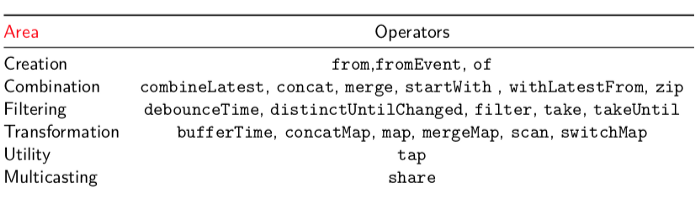
Ironically, what this did do, is start to create transparency around what would be considered a common operator. RxJS then went ahead and started creating what would be considered common operators.
^ I like to call these the RxJS airplane.
We will get into these at a very high level at a later time. It’s important to have this table in mind, so that you know the RxJS operators to keep an eye out for.
Subjects
It’s also worth noting the use of subjects within RxJS, as they get used quite often. A subject, in addition to being an observable, is also an observer. This means that we can use next to add value to an observable. Depending on the type of subject, the relationship with next will change. Three subjects come up quite common and are worth mentioning simply to keep them in mind.
Before we get to the different types of subjects, let’s first lightly graze what an observer is(,in addition to the observable which we are already familiar with). An observer is simply a set of callback function attached to an observable:
const observer = {
  next: x => console.log('Observer got a next value: ' + x),
  error: err => console.error('Observer got an error: ' + err),
  complete: () => console.log('Observer got a complete notification'),
};
Based on the type of callback called, that is the value the observable will have. So a subject is this observer type, in addition to the observable type already familiar with. With this is mind:
// RxJS v6+
import { Subject } from 'rxjs'; const sub = new Subject();
sub.next(1);
sub.subscribe(console.log);
sub.next(2); // OUTPUT => 2
sub.subscribe(console.log);
sub.next(3); // OUTPUT => 3,3 (logged from both subscribers)
In the above code, calling next will call all previously instantiated observables. Note the final next, which is logged from both subscribers, whereas the 2nd next, having only one subscriber instantiated, only logs one amount.
BehaviorSubject
BehaviorSubject As opposed to a subject, allows you to supply an initial value. It can be useful when creating something such as a re-usable component and want to supply an initial value. In addition, unit testing, and want to circumvent the extra code need to use next when mocking values.
// RxJS v6+
import { BehaviorSubject } from 'rxjs'; const subject = new BehaviorSubject(123);
// two new subscribers will get initial value => output: 123, 123
subject.subscribe(console.log); subject.subscribe(console.log);
// two subscribers will get new value => output: 456, 456
subject.next(456);
// new subscriber will get latest value (456) => output: 456
subject.subscribe(console.log);
// all three subscribers will get new value => output: 789, 789, 789
subject.next(789);
// output: 123, 123, 456, 456, 456, 789, 789, 789
ReplaySubject
ReplaySubject, in addition to allowing an initial value, will also store the old values.
// RxJS v6+
import { ReplaySubject } from 'rxjs';
const sub = new ReplaySubject(3);
sub.next(1);
sub.next(2);
sub.subscribe(console.log); // OUTPUT => 1,2
sub.next(3); // OUTPUT => 3
sub.next(4); // OUTPUT => 4
sub.subscribe(console.log);
// OUTPUT => 2,3,4 (log of last 3 values from new subscriber)
sub.next(5); // OUTPUT => 5,5 (log from both subscribers)
In the above code, we have given our ReplaySubject a buffer size of 3. Therefore, every next we have, before instantiating another subscribe, will introduce a buffer size of 3. This can be useful for instance when we are using something such as a timeline, or a table of contents, need to access to an observable and want to keep track of all previous selections of the user.
Naming Conventions for Observables
Hands down, my favorite naming convention in an Angular application is the use of a dollar sign $ as an indicator of an observable. Observables started becoming popular before the use of Typescript. While Typescript/RxJS does have the type annotation of <Observable> to indicate an observable, I still approve of the trailing $to indicate an observable.
import { Component } from '@angular/core'; import { Observable } from 'rxjs';
@Component({
  selector: 'app-stopwatch',
  templateUrl: './stopwatch.component.html'
})
export class StopwatchComponent {
  stopwatchValue: number; stopwatchValue$: Observable <number >;
  start () { this.stopwatchValue$.subscribe(num =>
   this.stopwatchValue = num );
  }
}
Why Dollar sign was chosen as a convention
You will notice in the above code, for the Observable stopwatchValue$, we add a $ to the end. This is to signify that this value is a stream. In many languages such as Java, there is a concept called a stream. While similar, there are some distinct difference such as:
- Observables are asynchronous as opposed to Streams, which aren’t.
- Observables can be subscribed to multiple times.
- Observables are push-based, streams are pull-based.
Nonetheless, being that streams existed before, and have this sort of naming convention, it bled it’s way to its cousin the observable.
Benefits of Naming Convention
The benefits of this naming convention are two-fold:
- When scanning through code, and looking for observable values
- If you want a non-observable value to store observable value, it can simply have no dollar value. This can then be used without a dollar sign, and makes for really transparent code.
That pretty much wraps up the introduction to RxJS as I would have liked to have been introduced to RxJS. I hope you like it because I really wanted to help with this one.